
What is Scribix?
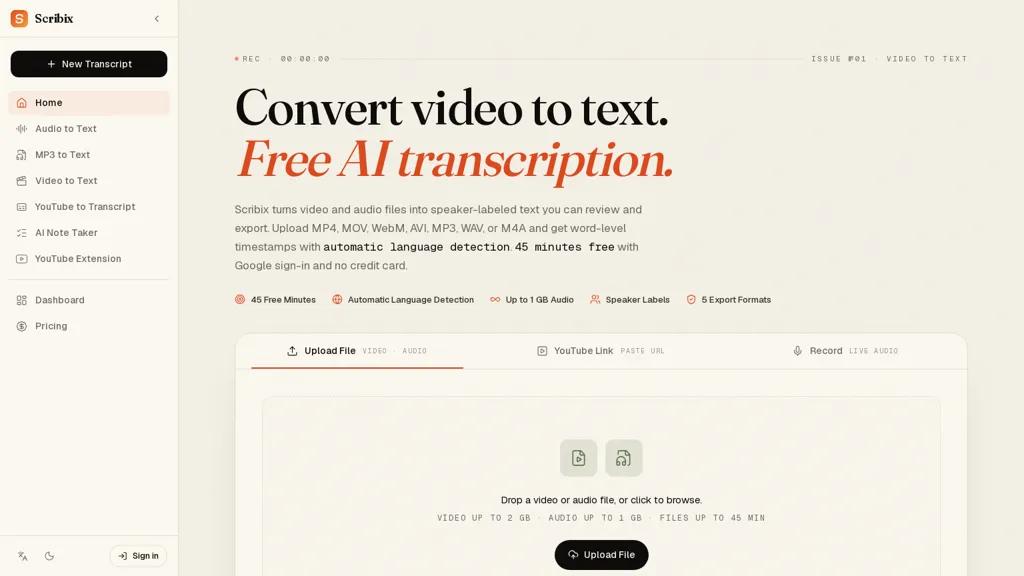
Scribix transcribes video and audio files into editable text with automatic language detection and speaker diarization.Supports common media formats (mp4, mov, webm, avi, mkv, mp3, wav, m4a) and accepts uploads, YouTube links, or live recordings.
Produces word-level timestamps and speaker labels for precise navigation, clip extraction, and time-coded captions.Exports in TXT, DOCX, SRT, VTT, and CSV for document workflows, subtitle creation, and spreadsheet analysis.
Inline editor lets users play from any word, correct text, rename speakers, and download final transcripts.Useful for creators repurposing long-form footage into captions and clips, podcasters and journalists generating show notes and quote-ready text, and researchers or students producing searchable transcripts for analysis.
Source files are deleted after 14 days and transcripts can be retained or removed by the user; transcription accuracy depends on audio quality, background noise, accents, and overlapping speech.
Scribix details
- Company
- CENDRO LABS PTY LTD
- Built for
- Individuals
Scribix pricing
Free trial- Auto-renewal
- Yes
Verify on the official pricing page.
Start free trialScribix's key features
-
Transcribes video and audio into editable text with automatic language detection and speaker diarization
-
Supports common media formats (mp4, mov, webm, avi, mkv, mp3, wav, m4a) and accepts uploads, YouTube links, and live recordings
-
Generates word-level timestamps and speaker labels for navigation, clip extraction, and time-coded captions
-
Exports transcripts in TXT, DOCX, SRT, VTT, and CSV formats
-
Inline editor with word-level playback, text editing, speaker renaming, and transcript download
Scribix use cases
-
Transcribe podcast episodes end-to-end with speaker-labeled transcripts, automatic language detection and word-level timestamps, clean up audio in the inline editor, extract clips and export TXT/DOCX/SRT for publication and show notes
-
Create SEO-friendly captions and subtitles for videos by transcribing YouTube links, fine-tuning timing in the inline editor and exporting timecoded SRT/VTT or DOCX for web playback and accessibility
-
Convert recorded interviews and focus groups into research-ready transcripts using speaker diarization and word-level timestamps, export CSV for analysis, extract highlight clips and generate polished transcripts for reports or citations
Scribix user reviews
Based on 1 review, 100% of users recommend Scribix, rated highly for quality results.
Liked for
Would you recommend Scribix?
Who is Scribix for?
-
Video editors
-
Podcasters
-
Journalists
-
Content creators
-
Social media managers
Scribix FAQ
Is Scribix free?
Not permanently. Scribix gives you a free trial, after which a paid plan is required. Plans include Starter at $12/mo and Pro at $19/mo.
Is Scribix safe to use?
Scribix is operated by CENDRO LABS PTY LTD.
What are the best alternatives to Scribix?
The closest alternatives to Scribix are TurboScribe, TranscribetoText.AI, Video Transcriber AI, Audio Transcription and AudioTranscriber.io. You can compare them side by side in the alternatives section further down this page.
What does Scribix do with my data?
Its privacy policy states that personal data is not sold or shared for marketing purposes. Data may be shared with third-party service providers that help run the product.
Does Scribix auto-renew or offer refunds?
Scribix subscriptions renew automatically until you cancel.
Who made Scribix?
Scribix is built and operated by CENDRO LABS PTY LTD.
Compliance, privacy and billing terms are as stated in each product's own published documentation and have not been independently verified by TopAI.tools.


