
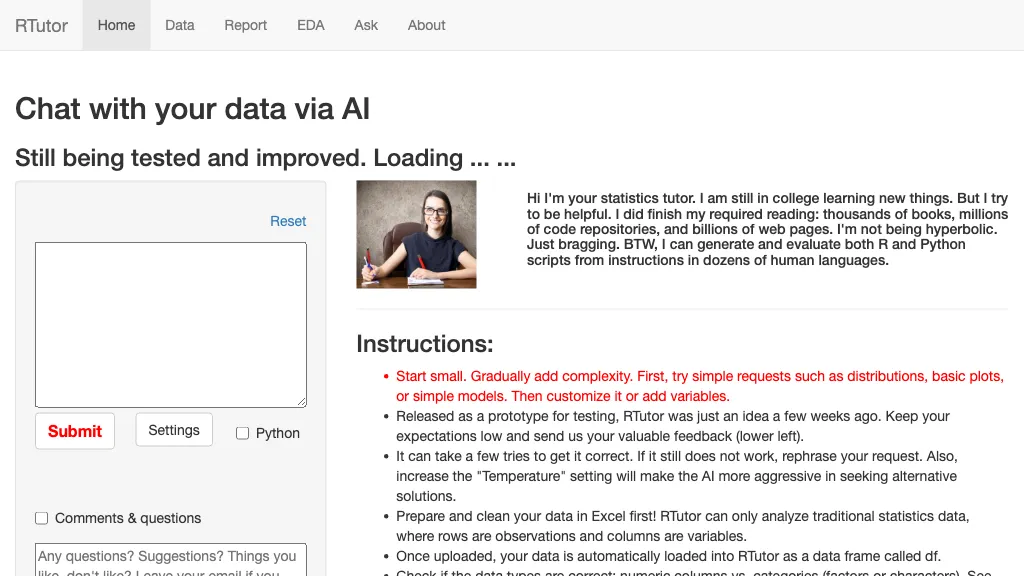
What is RTutor?
RTutor converts natural language requests into executable R or Python scripts for exploratory data analysis. The web interface lets users upload CSV, TSV, or Excel files that are automatically loaded into an R data frame named df, and a second file can be referenced as df2.
After uploading, the system generates descriptive statistics, correlation matrices, pair plots, histograms, Q‑Q plots, and summary tables using packages such as DataExplorer, summarytools, and GGally, and offers interactive visualizations with Plotly or CanvasXpress.
Users can refine the output by issuing new prompts that modify existing plots or code, and the tool retains session context so subsequent requests build on prior results. Generated code can be downloaded as an HTML report within minutes and is available for review or further editing.
The platform is intended for students, researchers, and analysts in educational or non‑profit settings and respects data privacy by discarding uploads after the session. The default model is GPT‑4o, with options to switch to a custom API key or to use Python instead of R.
RTutor details
- Company
- Orditus LLC
- Jurisdiction
- South Dakota, USA
RTutor tech specs
- Works with
- OpenAI / GPT
- Cloud
- AWS Azure
- Analytics
- Google Analytics
- Integrations
- GitHub Zoom
RTutor pricing
SubscriptionPricing details aren't listed here — check the official pricing page below.
Verify on the official pricing page.
View plansRTutor's key features
-
Upload CSV/Excel data
-
Translate natural language to code
-
Generate exploratory data analysis
-
Interactive Plotly and CanvasXpress plots
-
Analyze multiple data frames
-
Download HTML report
-
Prompt-based Q&A interface
RTutor use cases
-
Easily generate comprehensive descriptive statistics and interactive plots for a marketing campaign dataset by simply asking RTutor in natural language, eliminating the need for manual coding or advanced statistical knowledge
-
Transform raw customer feedback data into insightful Python scripts and visualizations with RTutor's prompt‑to‑code engine, enabling data scientists to prototype sentiment analysis models faster than writing boilerplate code
-
Assist university students in exploring economics datasets by uploading CSV files and using conversational prompts to create R data frames, summaries, and Plotly charts for their research projects without writing a single line of code
RTutor user reviews
Would you recommend RTutor?
Who is RTutor for?
-
Data scientists
-
Research scientists
-
Nonprofit leaders
-
Software developers
-
Voice recognition engineers
RTutor FAQ
Is RTutor free?
No. RTutor is a paid product and requires a paid plan to use.
Is RTutor safe to use?
RTutor is operated by Orditus LLC, registered in South Dakota, USA.
What are the best alternatives to RTutor?
The closest alternatives to RTutor are ChatCSV, Pandada AI, Sketch, plotsalot.app and STAT.AI. You can compare them side by side in the alternatives section further down this page.
What does RTutor do with my data?
RTutor states that customer content may be used to train its models. Its privacy policy states that personal data is not sold or shared for marketing purposes. Data may be shared with third-party service providers that help run the product.
Does RTutor have an API?
Yes. RTutor offers an API, so you can call it from your own applications instead of using the interface directly.
Who made RTutor?
RTutor is built and operated by Orditus LLC, a company registered in South Dakota, USA.
Which AI models does RTutor use?
RTutor is built on OpenAI / GPT. Which models you can reach may depend on your plan.
What does RTutor integrate with?
RTutor connects with GitHub and Zoom.
Compliance, privacy and billing terms are as stated in each product's own published documentation and have not been independently verified by TopAI.tools.


