
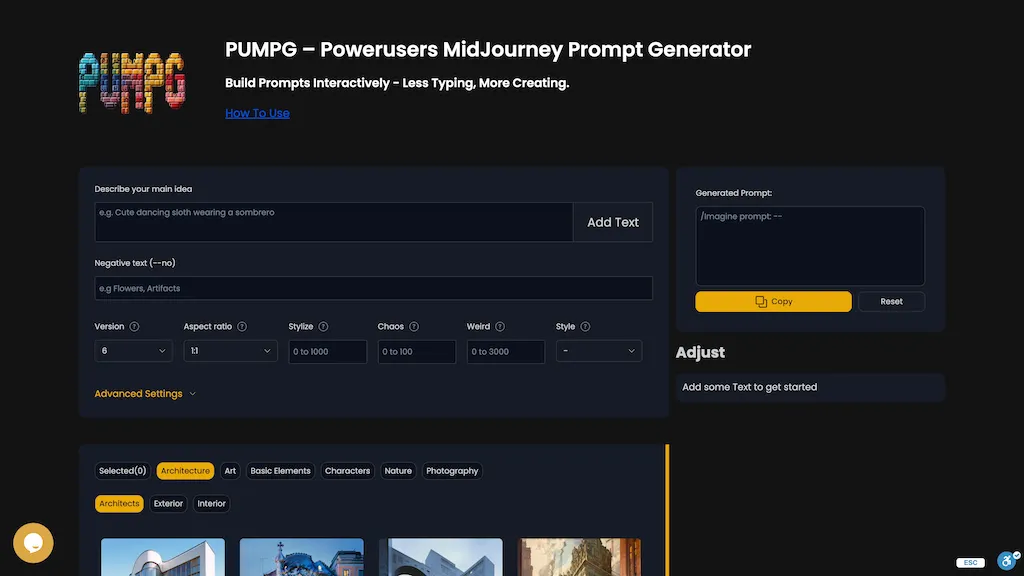
What is PUMPG - Midjourney prompt generator?
PUMPG – Powerusers MidJourney Prompt Generator enables users to build detailed Midjourney prompts through an interactive interface that includes fields for main idea, negative text, model version, aspect ratio, stylization, chaos, and more. Tooltips clarify each parameter, showing how options such as --s (stylize), --style, and --chaos influence the resulting image.
Image references can be added via Style Reference (Sref) or Character Reference (Cref), with adjustable weight controls to shape style and character consistency. Advanced settings give control over speed, quality, seed, repeat count, and stop percentage, helping users manage GPU usage and iteration.
The builder also supports video output, tile creation, and model‑specific parameters for Niji 5, Niji 6, and other Midjourney versions. PUMPG is useful for artists, designers, and hobbyists who need a structured, efficient way to generate and refine Midjourney prompts.
PUMPG - Midjourney prompt generator details
- Jurisdiction
- State of Michigan
PUMPG - Midjourney prompt generator tech specs
- Works with
- OpenAI / GPT OpenAI / DALL-E Stability AI Midjourney
- Integrations
- Discord
PUMPG - Midjourney prompt generator pricing
FreeThis tool is free to use, with no credit card required.
Verify on the official pricing page.
Get started freePUMPG - Midjourney prompt generator's key features
-
Interactive prompt builder with drag-and-drop
-
Customizable parameters: aspect ratio, stylize, chaos
-
Advanced image references: Sref, Cref
-
Tooltips explain parameter usage
-
Adjustable speed: relax, turbo, fast
-
Adjustable quality and stop options
-
Video and tile generation outputs
PUMPG - Midjourney prompt generator use cases
-
Generate detailed Midjourney prompts for marketing creatives by specifying target audience, negative keywords, and stylization—all within the interactive builder
-
Produce seamless tileable patterns for architectural visualization using the builder’s aspect‑ratio and image‑reference weighting features
-
Create consistent frame‑by‑frame video content for short films by adjusting chaos and iteration parameters in the advanced settings
PUMPG - Midjourney prompt generator user reviews
Based on 7 reviews, 57% of users recommend PUMPG - Midjourney prompt generator, rated highly for ease of use.
Liked for
Disliked for
Would you recommend PUMPG - Midjourney prompt generator?
Who is PUMPG - Midjourney prompt generator for?
-
Digital artists
-
Content creators
-
Product designers
-
Creative directors
-
E-commerce sellers
PUMPG - Midjourney prompt generator FAQ
Is PUMPG - Midjourney prompt generator free?
Yes. PUMPG - Midjourney prompt generator is free to use and does not require a credit card.
What are the best alternatives to PUMPG - Midjourney prompt generator?
The closest alternatives to PUMPG - Midjourney prompt generator are Prompt Builder, IMI Prompt, ImagePromptGuru.net, PromptExtend and AIImageGenerator. You can compare them side by side in the alternatives section further down this page.
What does PUMPG - Midjourney prompt generator do with my data?
Its privacy policy states that personal data is not sold or shared for marketing purposes. Data may be shared with third-party service providers that help run the product.
Which AI models does PUMPG - Midjourney prompt generator use?
PUMPG - Midjourney prompt generator is built on OpenAI / GPT, OpenAI / DALL-E, Stability AI and Midjourney. Which models you can reach may depend on your plan.
What does PUMPG - Midjourney prompt generator integrate with?
PUMPG - Midjourney prompt generator connects with Discord.
Compliance, privacy and billing terms are as stated in each product's own published documentation and have not been independently verified by TopAI.tools.


