
What is Plagiarism Remover?
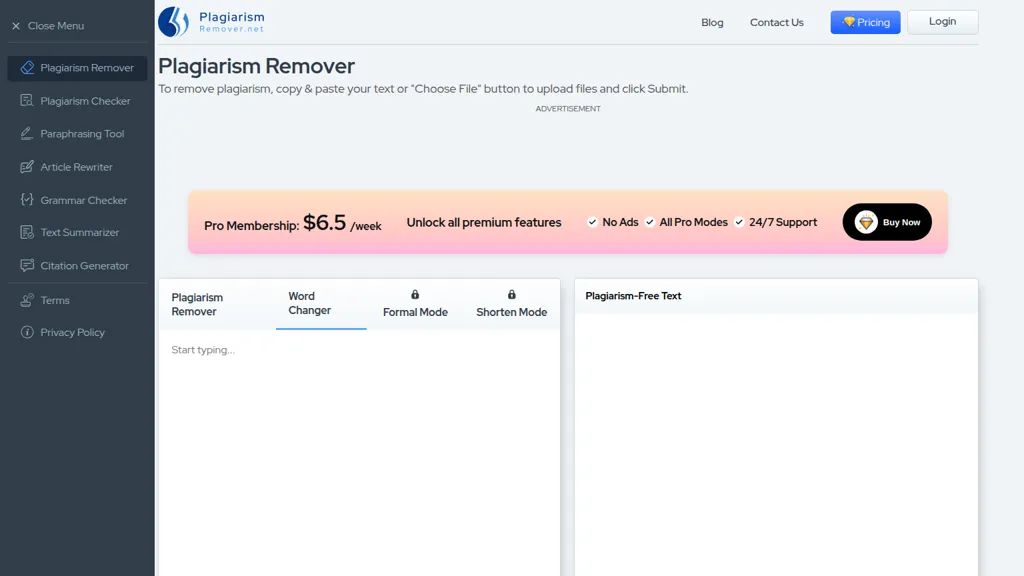
Plagiarism Remover — an AI-based plagiarism remover that rewrites duplicate text using NLP and deep learning while preserving original context and readability. Key features include multiple modes (Plagiarism Remover, Word Changer, Formal, Shorten), in-app word count, file upload and download (.
txt, .docx), and multi-language support across 15+ languages. Integrated tools cover plagiarism checking, paraphrasing, article rewriting, grammar checking, text summarizing, and citation generation for end-to-end content preparation. Users can paste text or upload documents, select a mode and language, and receive rewritten content ready for export.
The Word Changer mode focuses on synonym replacement, Formal adjusts tone for professional use, and Shorten condenses text while reducing duplication. The tool is suited for bloggers, students, content writers, and freelancers who need plagiarism-free material and faster revision workflows.
Plagiarism Remover details
- Built for
- Individuals
Plagiarism Remover pricing
Free- Refund window
- 3 days
Verify on the official pricing page.
Get started freePlagiarism Remover's key features
-
File upload and copy-paste input
-
Four processing modes: Plagiarism Remover, Word Changer, Formal, Shorten
-
Multiple language support (15+ languages)
-
NLP and Deep Learning-based rewriting to remove plagiarism while preserving context
-
Displays word count
Plagiarism Remover use cases
-
Rewrite academic papers, essays, or research abstracts to remove duplicate phrasing while preserving context and meaning using the tool’s Formal or Word Changer modes, auto-generate and export citations, run an integrated plagiarism check, and download the cleaned file for submission
-
Repurpose marketing copy, blog posts, and product descriptions across 15+ languages by using the Shorten and synonym-replacement modes to create concise, brand-aligned content, apply grammar and paraphrasing tools for publication-ready text, then upload/download files as needed
-
Condense long reports, meeting notes, or legal documents into clear executive summaries with the Shorten mode, maintain a professional tone with the Formal mode, verify originality with the plagiarism checker, and export final summaries and citation lists for stakeholder distribution
Plagiarism Remover user reviews
Would you recommend Plagiarism Remover?
Who is Plagiarism Remover for?
-
Content strategists
-
Software developers
-
Data analysts
-
E-commerce sellers
-
Technical writers
Plagiarism Remover FAQ
Is Plagiarism Remover free?
Yes. Plagiarism Remover is free to use and does not require a credit card.
What are the best alternatives to Plagiarism Remover?
The closest alternatives to Plagiarism Remover are Paraphrasing.io, Rewording Tool, Article Rewriter, Paraphrasingtool.ai and Quillbot Paraphraser. You can compare them side by side in the alternatives section further down this page.
What does Plagiarism Remover do with my data?
Its privacy policy states that personal data is not sold or shared for marketing purposes. Data may be shared with third-party service providers that help run the product.
Does Plagiarism Remover auto-renew or offer refunds?
Plagiarism Remover states a 3-day refund window.
Compliance, privacy and billing terms are as stated in each product's own published documentation and have not been independently verified by TopAI.tools.


