
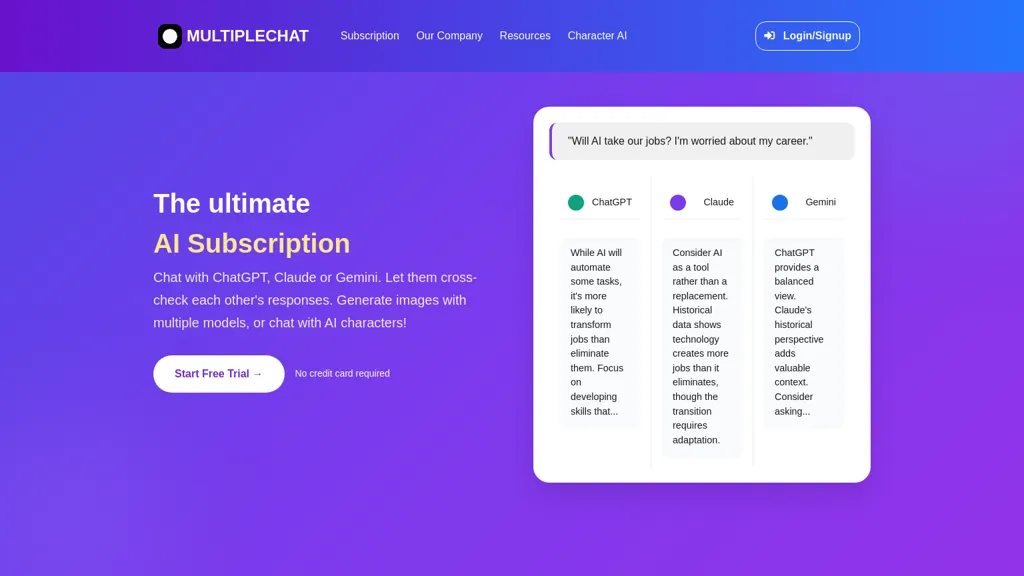
What is MultipleChat?
MultipleChat is an AI collaboration platform that unifies ChatGPT, Claude, Gemini, Grok, and Perplexity into one prompt, delivering a single, verified answer while showing each model’s individual response side‑by‑side. The system performs real‑time, multi‑model debates that automatically flag conflicts and attach source references, enabling researchers and analysts to validate information quickly.
It offers specialized studios for generating documents, slide decks, spreadsheets, and images, with options to use a single model or an ensemble for higher quality output. The Humanizer feature learns from a user’s existing documents and writes new content that matches the user’s tone, structure, and phrasing.
MultipleChat includes project management, prompt optimization, and automated fact‑checking tools, supporting academic research, corporate communications, and creative content creation. Its API‑driven architecture allows developers to embed collaborative AI capabilities into custom workflows.
MultipleChat details
- Company
- NLP GmbH
- Jurisdiction
- Switzerland
- Built for
- Businesses and teams
- Data residency
- Europe (Azure regional servers)
- Stated compliance
- SOC 2, GDPR, ISO 27001, CCPA
Compliance as stated in MultipleChat's own published documentation.
MultipleChat tech specs
- Works with
- OpenAI / GPT OpenAI / DALL-E Anthropic / Claude Google / Gemini Google / Nano Banana Mistral Stability AI xAI / Grok Perplexity Ideogram Recraft
- AI infrastructure
- Together AI
- Cloud
- Firebase
- Payment Processors
- Stripe
- Analytics
- Google Analytics Microsoft Clarity
- Integrations
- Google Workspace GitHub
MultipleChat pricing
Free trialMultipleChat offers a free trial before requiring payment.
Verify on the official pricing page.
Start free trialMultipleChat's key features
-
Multi-model AI collaboration
-
Real-time side-by-side comparison
-
Document creation studio
-
Presentation deck generation
-
Excel data transformation
-
Personalized AI humanizer
-
Conflict detection & fact-checking
MultipleChat use cases
-
Generate a comprehensive multi‑format marketing campaign deck by prompting MultipleChat once, letting ChatGPT draft slide content, Claude refine tone, and Gemini produce visual assets, all displayed side‑by‑side for instant comparison.
-
Conduct a conflict‑flagging product requirements review: input the spec document, MultipleChat auto‑debates each AI’s interpretation, highlights disagreements, and supplies source references so stakeholders can make informed decisions.
-
Create a multilingual FAQ spreadsheet for a global customer support team: submit the core Q&A, let MultipleChat’s models translate, format into a single Excel sheet, and automatically flag any content discrepancies across language versions.
MultipleChat user reviews
Based on 2 reviews, 50% of users recommend MultipleChat, rated highly for quality results.
Liked for
Disliked for
Would you recommend MultipleChat?
Who is MultipleChat for?
-
Education educators
-
Marketing marketers
-
Business analysts
-
Content creators
-
Product designers
MultipleChat FAQ
Is MultipleChat free?
Not permanently. MultipleChat gives you a free trial, after which a paid plan is required.
Is MultipleChat safe to use?
MultipleChat states SOC 2, GDPR, ISO 27001 and CCPA compliance in its own published documentation. MultipleChat is operated by NLP GmbH, registered in Switzerland. It has a substantial audience that is independently measured month to month.
What are the best alternatives to MultipleChat?
The closest alternatives to MultipleChat are Claude AI, Google Gemini, Monica, Chatbot AI and Overchat. You can compare them side by side in the alternatives section further down this page.
What does MultipleChat do with my data?
MultipleChat states that customer content is not used to train its models. Its privacy policy states that personal data is not sold or shared for marketing purposes. Data may be shared with third-party service providers that help run the product. Customer data is held in Europe (Azure regional servers).
Does MultipleChat have an API?
Yes. MultipleChat offers an API, so you can call it from your own applications instead of using the interface directly.
Who made MultipleChat?
MultipleChat is built and operated by NLP GmbH, a company registered in Switzerland.
Which AI models does MultipleChat use?
MultipleChat is built on OpenAI / GPT, OpenAI / DALL-E, Anthropic / Claude, Google / Gemini, Google / Nano Banana, Mistral, Stability AI, xAI / Grok, Perplexity, Ideogram and Recraft. Which models you can reach may depend on your plan.
What does MultipleChat integrate with?
MultipleChat connects with Google Workspace and GitHub.
Compliance, privacy and billing terms are as stated in each product's own published documentation and have not been independently verified by TopAI.tools.


