
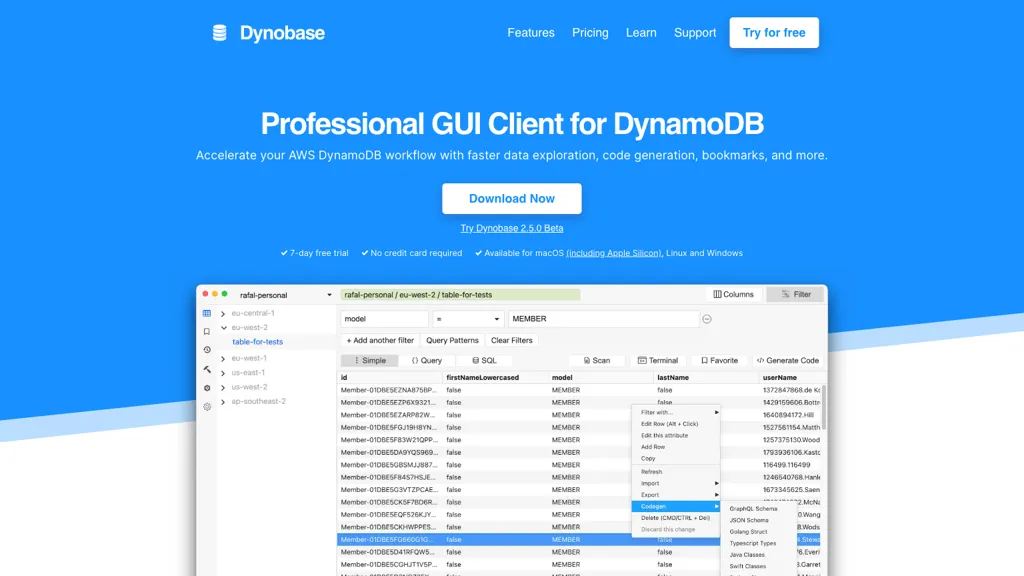
What is Dynobase?
Dynobase is a cross‑platform GUI client for AWS DynamoDB that supports macOS, Linux, and Windows.
It accesses tables using existing AWS CLI profiles, including SSO and aws‑vault, keeping credentials local.
Users can view and edit items directly as JSON, with inline validation and dry‑run previews.
A query builder automatically selects Query or Scan operations and can generate equivalent SQL using PartiQL.
The terminal panel lets users manipulate query results with JavaScript, enabling advanced filtering and mapping.
AI code generation produces production‑ready snippets in JS/TS, Rust, Go, or Python from natural‑language prompts.
Data import and export support CSV and JSON formats, and offline operation works with DynamoDB Local and LocalStack.
Multi‑tab navigation, bookmarks, and history mimic browser behavior for efficient reuse of common queries.
Operation builder provides a WYSIWYG interface that outputs SDK‑ready code for updates, deletes, and transactions.
Dynobase details
- Built for
- Individuals
Dynobase tech specs
- Cloud
- AWS
Dynobase pricing
Free trialDynobase offers a 7-day free trial before requiring payment.
- Free trial
- 7 days
Verify on the official pricing page.
Start free trialDynobase's key features
-
Multi‑region and multi‑account connectivity
-
AI‑driven code generation for DynamoDB
-
SQL/PartiQL query support
-
CSV/JSON import and export
-
Inline editing with dry‑run preview
-
Terminal REPL with JavaScript transformations
-
Automatic query optimization
Dynobase use cases
-
Import and preview CSV data directly into DynamoDB with Dynobase’s drag‑and‑drop import, edit items inline, and export back to CSV for reporting
-
Build and execute PartiQL queries using Dynobase’s auto‑suggestion builder, then let the AI generate ready‑to‑paste AWS SDK code for Node.js or Python
-
Develop and test JavaScript logic against live query results inside Dynobase’s integrated terminal, allowing quick prototyping of Lambda functions without leaving the app
Dynobase user reviews
Would you recommend Dynobase?
Who is Dynobase for?
-
Software developers
-
Database engineers
-
Cloud architects
-
Data analysts
-
System administrators
Dynobase FAQ
Is Dynobase free?
Not permanently. Dynobase gives you a free trial of 7 days, after which a paid plan is required.
What does Dynobase do with my data?
Dynobase states that customer content is not used to train its models. Its privacy policy states that personal data is not sold or shared for marketing purposes. Data may be shared with third-party service providers that help run the product.
Compliance, privacy and billing terms are as stated in each product's own published documentation and have not been independently verified by TopAI.tools.