
What is DraGAN?
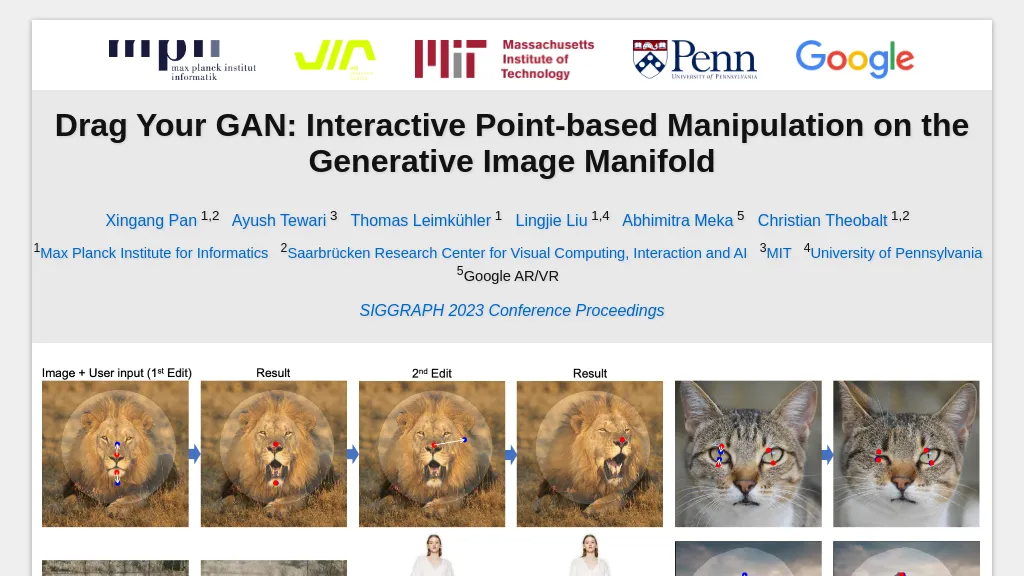
Drag Your GAN, interactive point-based manipulation on the generative image manifold. This tool lets users drag specific points in an image to target positions, providing precise control over pose, shape, expression, and layout for categories such as animals, cars, humans, and landscapes.
Drag Your GAN employs feature-based motion supervision to guide handle points toward desired locations and a point tracking approach that uses discriminative GAN features to maintain accurate handle localization. The method operates on the learned generative image manifold, producing realistic outputs even when hallucinating occluded content or preserving object rigidity.
Researchers, designers, and artists can apply Drag Your GAN to both synthetic images and real photographs through GAN inversion, enabling detailed editing without manual annotations or 3D models. The tool includes publicly available code, a research paper, and demo images for accelerated exploration.
DraGAN details
- Company
- Max-Planck-Gesellschaft zur Förderung der Wissenschaften e.V.
DraGAN tech specs
- Integrations
- Google Workspace
DraGAN pricing
FreeThis tool is free to use, with no credit card required.
Verify on the official pricing page.
Get started freeDraGAN's key features
-
Interactive point-based image manipulation
-
Feature-based motion supervision
-
GAN feature point tracking
-
Precise pixel-level control
-
Realistic occlusion hallucination
-
GAN inversion for real images
DraGAN use cases
-
Create realistic product photos for e‑commerce by dragging points to adjust model pose and clothing fit, using GAN inversion for photorealistic edits without manual retouching
-
Transform landscape images by manipulating key points to change weather, lighting, or add features like mountains and rivers, achieving instant, semantic edits on the generative manifold
-
Generate varied facial expressions for character concept art by dragging points to adjust mouth, eyes, and head pose, enabling designers to explore multiple expressions quickly with GAN‑based editing
DraGAN user reviews
Based on 1 review, 100% of users recommend DraGAN, rated highly for quality results.
Liked for
Would you recommend DraGAN?
Who is DraGAN for?
-
Image creators
-
Visual designers
-
Software developers
-
Digital marketers
-
Creative artists
DraGAN FAQ
Is DraGAN free?
Yes. DraGAN is free to use and does not require a credit card.
Is DraGAN safe to use?
DraGAN is operated by Max-Planck-Gesellschaft zur Förderung der Wissenschaften e.V..
What are the best alternatives to DraGAN?
The closest alternatives to DraGAN are PhotoGPT.io. You can compare them side by side in the alternatives section further down this page.
What does DraGAN do with my data?
Its privacy policy states that personal data is not sold or shared for marketing purposes. Data may be shared with third-party service providers that help run the product.
Who made DraGAN?
DraGAN is built and operated by Max-Planck-Gesellschaft zur Förderung der Wissenschaften e.V..
What does DraGAN integrate with?
DraGAN connects with Google Workspace.
Compliance, privacy and billing terms are as stated in each product's own published documentation and have not been independently verified by TopAI.tools.
