
What is Coool AI?
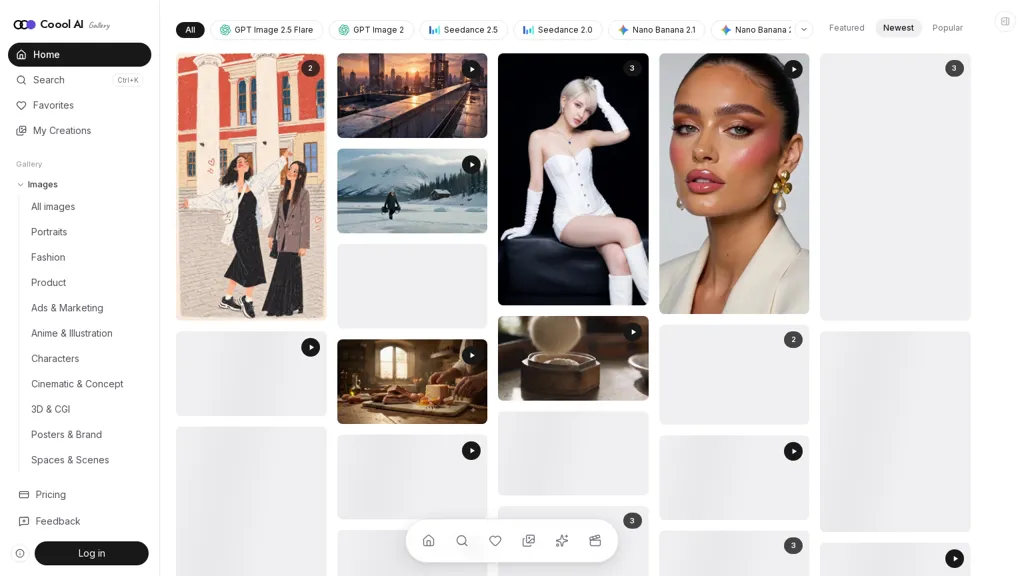
Coool AI is a visual AI prompt search engine, inspiration gallery, and image and video creation workspace. It helps creators find a visual direction, see the prompt behind an example, adapt it to their own project, and generate a new result in the same interface.
The platform is designed for content creators, designers, marketers, e-commerce sellers, and people making AI images and videos. Its workflow starts with finished examples, giving users a concrete starting point for both the visual style and the instructions needed to create something similar.
1. Discover image and video ideas Browse galleries organized by model and creative category, with featured, newest, popular, and trending examples. Image categories include portraits, fashion, product photography, advertising, illustration, characters, cinematic concepts, 3D, posters, and interiors.
Video categories include UGC-style ads, product demos, cinematic scenes, fashion, character stories, lifestyle, food, travel, and brand commercials.
Search by subject, style, intended use, or model. Search combines semantic matching with keyword search to help users find relevant examples from a natural-language description.
2. Copy prompts or remix them directly Open an example to inspect its image or video, read the full prompt, check creator attribution and source information, and explore related ideas. Copy the prompt for use in another tool, or select Create Similar to load it into Coool AI’s Generate panel.
Edit the subject, setting, lighting, composition, visual style, or camera direction to fit a different brief. Supported image examples can also be used as references.
3. Generate images and videos with multiple models Access image models including Nano Banana, GPT Image, Midjourney, Flux, and Seedream, alongside video models including Seedance, Kling, Veo, Wan, and Runway.
Create images from text, edit images using references, generate videos from text, or animate a still image. Depending on the selected model, video workflows also support start and end frames or additional reference media.
Adjust supported settings such as aspect ratio, resolution, output count, and video duration. The Generate button shows the credit cost before submission, and a model comparison page provides costs by resolution and duration.
4. Develop and refine prompts Image to Prompt turns an uploaded image into an editable prompt description. Enhance expands an existing idea into a more detailed prompt, with a preview users can review and edit before applying. Prompt translation helps users understand and adapt prompts across languages.
5. Save references and manage creations Save gallery examples and personal creations to Favorites, then organize them into boards for different projects, campaigns, or visual styles. Eligible paid plans allow boards to be shared by link.
My Creations keeps generated images and videos together with their prompts and settings. Users can download results, regenerate with the same settings, reopen a creation for editing, remove an image background, or use a still image to start a video.
6. Free discovery with credit-based generation Browsing and copying public prompts is free. New accounts receive 20 trial credits for image generation. Paid subscriptions provide recurring credits, while one-time credit packs offer credits that never expire and can be purchased without a subscription.
Video generation and higher-resolution options require an eligible paid plan. Generation costs depend on the selected model and settings, and failed generations automatically return the credits used.
Coool AI pricing
SubscriptionVerify on the official pricing page.
View plansCoool AI's key features
-
Aggregates image and video outputs from multiple generative models
-
Searchable, categorized gallery covering portraits, fashion, product, cinematic, 3D, and illustration
-
Gallery items include actions to create similar outputs, add to favorites, save creations, and visit original sources
-
Built-in search, tagging, and browsing controls for discovery and reference use
-
On-platform image and video generation integrated with gallery-based reference workflows
Coool AI use cases
-
Rapid visual ideation for fashion and product designers by searching Coool AI’s cross-model gallery (portraits, fashion, product, 3D), saving and tagging favorites into organized collections, and using create-similar plus on-platform generation to quickly iterate and produce polished concept boards without leaving the tool
-
Create cohesive marketing and ad asset libraries by compiling searchable, tagged cinematic and illustration references from multiple generative models, assembling moodboards for campaigns, generating stylistic variants on-platform, and exporting consistent image sets for A/B testing and creative briefs
-
Streamline concept art and 3D asset workflows for game and film teams by finding style-specific references in Coool AI’s organized gallery, favoriting and sharing tagged collections for team collaboration, and launching reference-driven generation to produce customizable, production-ready concept images and storyboards
Coool AI user reviews
Would you recommend Coool AI?
Who is Coool AI for?
-
Illustrators
-
3d artists
-
Fashion designers
-
Product designers
-
Photographers
-
Videographers and filmmakers
-
Art directors and creative directors
-
Graphic designers
-
Marketers and advertisers
-
Social media and content creators
-
Design teams and agencies
-
Students and educators in visual arts
Coool AI FAQ
How much does Coool AI cost?
Coool AI is a paid product with no free plan. Plans include Starter at $9.9/mo, Pro at $19.9/mo and Max at $49.9/mo.
What are the best alternatives to Coool AI?
The closest alternatives to Coool AI are Image Prompt Generator, AIAI, AI Art Create, AIReel and DeepAI. You can compare them side by side in the alternatives section further down this page.


