
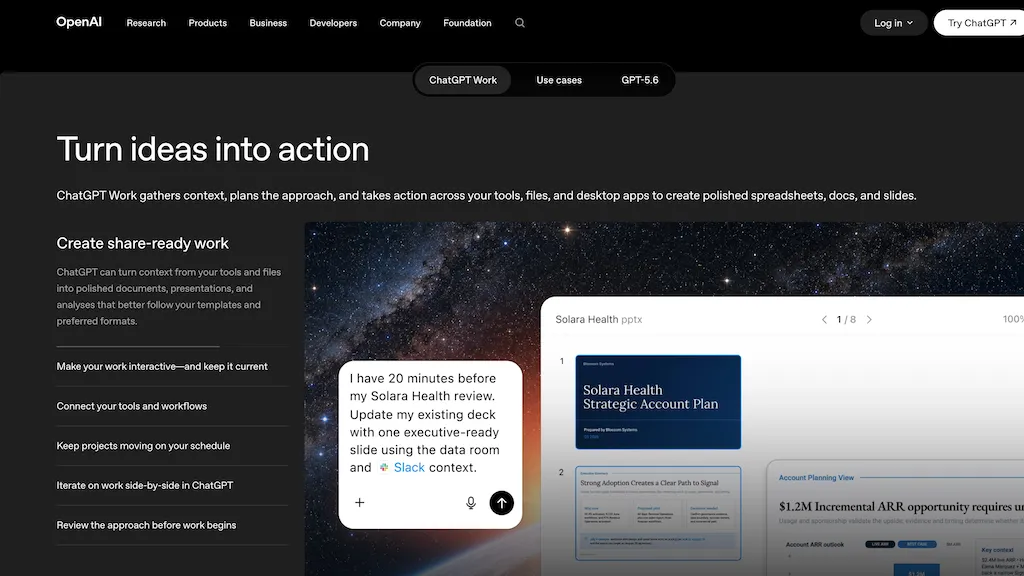
What is Chatgpt Work?
ChatGPT Work (GPT-5.6) organizes context from files, tools, and desktop apps to generate documents, spreadsheets, presentations, dashboards, and prototypes.It produces step-by-step plans, schedules one-time and recurring tasks, monitors updates, and automates routine workflows across connected systems.
With support for 1,400+ plugins and a built-in browser plus multi-tab desktop app, teams can pull data from CRMs, ticketing systems, cloud storage, and analytics tools.Common use cases include finance modeling, operations tracking, marketing analysis, sales lead triage, product research, and engineering reports.
Outputs can follow templates and preferred formats and be published as interactive sites, dashboards, project trackers, or executive presentations.Web, desktop, and mobile access enable cross-team collaboration and continuous project updates.
Chatgpt Work details
- Company
- OpenAI Ireland Ltd
- Data residency
- United States
- Stated compliance
- GDPR
Compliance as stated in Chatgpt Work's own published documentation.
Chatgpt Work tech specs
- Works with
- OpenAI / GPT
- Integrations
- Zapier Google Workspace Shopify
Chatgpt Work pricing
FreemiumChatgpt Work offers a free plan with paid upgrades available.
- Refund window
- 14 days
- Auto-renewal
- Yes
Verify on the official pricing page.
View plansChatgpt Work's key features
-
Organizes context from files, tools, and desktop apps to generate documents, spreadsheets, presentations, dashboards, and prototypes
-
Produces step-by-step plans, schedules one-time and recurring tasks, monitors updates, and automates routine workflows across connected systems
-
Integrates with plugins and includes a built-in browser plus a multi-tab desktop app to pull data from CRMs, ticketing systems, cloud storage, and analytics tools
-
Generates outputs following templates and preferred formats and publishes them as interactive sites, dashboards, project trackers, or presentations
-
Accessible via web, desktop, and mobile applications
Chatgpt Work use cases
-
Create a context-aware project kickoff package by consolidating meeting notes, design files, Jira tickets, and Slack threads across systems into a roadmap, slide deck, and actionable spreadsheet while automatically scheduling follow-ups and assigning owners without any coding
-
Automate monthly executive reporting by aggregating sales, marketing, and product metrics via 1,400+ plugin integrations into interactive dashboards and exportable reports, publishing them to stakeholder channels on a recurring schedule with automated alerts
-
Build interactive product prototypes and handoff documentation by merging user research, design assets, and technical specs into clickable prototypes, collaborative docs, and cross-system workflows that update project boards and notify engineers in real time
Chatgpt Work user reviews
Based on 2 reviews, 100% of users recommend Chatgpt Work, rated highly for quality results.
Liked for
Would you recommend Chatgpt Work?
Who is Chatgpt Work for?
-
Software engineers
-
Product managers
-
Data analysts
-
Project managers
-
Finance analysts
Chatgpt Work FAQ
Is Chatgpt Work free?
Partly. Chatgpt Work has a free plan with usage limits, and paid plans unlock the full feature set.
Is Chatgpt Work safe to use?
Chatgpt Work states GDPR compliance in its own published documentation. Chatgpt Work is operated by OpenAI Ireland Ltd. Chatgpt Work carries the TopAI.tools verified mark, which we award after a manual review of pricing transparency, published terms, public following and working functionality.
What are the best alternatives to Chatgpt Work?
The closest alternatives to Chatgpt Work are Genspark.ai, TextCortex, GlobalGPT, GPTAgent and FileGPT. You can compare them side by side in the alternatives section further down this page.
What does Chatgpt Work do with my data?
Chatgpt Work states that customer content may be used to train its models. Its privacy policy states that personal data is not sold or shared for marketing purposes. Customer data is held in United States.
Does Chatgpt Work auto-renew or offer refunds?
Chatgpt Work subscriptions renew automatically until you cancel. It states a 14-day refund window.
Does Chatgpt Work have an API?
Yes. Chatgpt Work offers an API, so you can call it from your own applications instead of using the interface directly.
Who made Chatgpt Work?
Chatgpt Work is built and operated by OpenAI Ireland Ltd.
Which AI models does Chatgpt Work use?
Chatgpt Work is built on OpenAI / GPT. Which models you can reach may depend on your plan.
What does Chatgpt Work integrate with?
Chatgpt Work connects with Zapier, Google Workspace and Shopify.
Compliance, privacy and billing terms are as stated in each product's own published documentation and have not been independently verified by TopAI.tools.


